Rodos, tell me something about vShield Zones! Well read on if you want a quick low down.
The reason for this post is that I knew vShield Zones was released on June 10. As I am doing the planning on a huge deployment I wondered if vShield Zones could be used to provide some extra security layers, but I really have little idea of what it actually is, its benefits and limitations. A quick search of the Internet did not bring up any real details apart from marketing materials, not even Yellow-Bricks. If Duncan has not written anything on this then I am afraid I was on my own, so I hit the documentation.
So here you have it, my notes, questions and thoughts on VMware vShield Zones. Its not a deep analysis, more of a dump of my reading notes. I figured best to know what it is and any limitations before doing a download and running it up in a lab!
Links
The few blog posts that have been madeBackground
VMware acquired Blue Lane Technologies (
http://www.bluelane.com/) in October 2008. For the details read over the
VMware acquires Blue Lane and
VMware goes deeper into Security world posts at virtualization.info.
What does it do?
You can think of vShield as providing firewalls inside your ESX hosts. Each host runs one or more
vShields which is a VM (provided as an OVF) which acts as a bridge between the real network and your Virtual Machines. These numerous vShield machines are all managed by a central
vShield Manager (also provided as an OVF, one per vCenter Server).
The vShield creates two zones, one protected and the other unprotected. The traffic enters the protected zone from the unprotected zone. As it crosses the zones the vShield performs traffic analysis, discovery and stateful firewall protection.
For each vSwitch with a pNIC you will need to deploy a separate vShield to create a protected zone off it.
The Virtual Machines protected by a vShield all sit within a port group so they can freely talk to each other within the zone, the port group has Promiscuous Mode turned on.
The vShield Virtual Machine itself has three vNICs. One is for the management interface to talk to the vShield Manager. The second is for the portgroup of the protected machines and the third for the portgroup of the unprotected machines.
Here is what it looks like logically in a slide from the VMworld session.
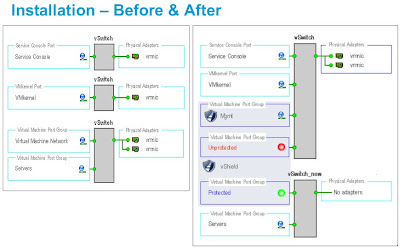
You can see in the right hand side there are two port groups on the vSwitch that has the pNics, one is the management port group and the other is the un-protected port group. The vShield has a vNIC into each of these, it then acts as the bridge/firewall into the isolated vSwitch that contains the protected port group where the protected virtual machines will now live.
Stateful Firewall Protection (VM Wall)You create firewall rules based on traffic direction, application protocols and ports and specific source-to-destination parameters. Rules are placed at the DataCenter or the Cluster level.
Rules can be Layer 4 or Layer 2/Layer 3. Layer 2/Layer rules which govern things such as ICMP, ARP etc are enforced at the datacenter level only.
Traffic Analysis (VM Flow)
By inspecting each passing packet the vShields gathers information which is aggregated into the vShield Manager. This then becomes a forensic tool to detect services, examine inbound and outbound sessions and forms an easy way to create VM Wall access rules.
You can view the statistics at either the DataCenter, Cluster, vShield instance or individual Virtual Machine level. It shows the last seven days but you can select a date range. You can drill down through the data.
Virtual Machine Discovery
vShield builds an inventory of Virtual Machines showing the operating systems, applications (ports) and open ports on each virtual machine. Discovery is either continuous, run on demand or run on a schedule. Periodic discovery conflicts with continuous discovery and scheduling a periodic terminates the continuous one and does not re-enable it.
User Interface
You interact with the Manager via a web interface or a CLI. There is also a vSphere Client plug-in. The user authentication is different for the web and CLI interfaces and neither is integrated with vCenter Server or a central authentication system such as LDAP. For vShield Manager you can have different roles and rights, these are created and maintain within vShield Manager and there is no integration with vCenter Server. The CLI has either a Basic (read-only) or a Privileged mode.
What does it Cost?
vShield Zones is included in the Advanced, Enterprise and Enterprise Plus editions of vSphere 4.
Notes and Limitations
- By default any machine in a vShield zone can not be vMotioned. This is because it on a vSwitch that is not connected to a pNIC and hence VMotion assumes its connected to a virtual intranet. If you build the environment so that all the ESX hosts have the right vShields and port group names you can allow VMotion. If you use the automatic deployment it should be setup this way. However to do this you need to go and hack the vpxd.cfg file for vCenter Server and change the setting for VMonVirtualIntranet. My issue with this is its an all or nothing setting. What if you actually do have a vSwitch that is isolated to do some testing or something, a VM on it may now get VMotioned, you will need to remember to go and turn VMotion off for any of those VMs which are exceptions. I can see someone forgetting this detail and things getting screwy.
- As Layer 2/Layer rules are enforced at the datacenter level only I suspect that if you have two Clusters in a DataCenter you can’t have one which will allow ICMP and the other not, which could be a real annoying limitation.
- You can backup the data from the vShield Manager to a remote SFTP or FTP server. This can be done manually or scheduled. It creates a unique filename per backup.
- Updates are done via downloading them to your PC and then uploading them to the vShield Manager. The vShield Manager updates all the vShield instances. It looks like reboots are required for updates of the vShields which I imagine would cause a network outage.
- It does work with normal vSwitches and vNetwork Distributed Switches. However for vNDS you have to set everything up manually, it can’t auto deploy itself.
- If you want to keep your vSwitch names the same as they were before you implemented vShield you will need to deploy manually and move to a temporary vNDS and then recreate the protected group with the original name.
- There are a few references to Blue Lane in the documentation. In the CLI reference there were 31 commands which are listed and then in the description it says “Deprecated. Do not use.”
- You can delete all previously recorded Flows but there is nothing in the documentation about rollup or archiving. What type of rollup does it do on the statistics gathered? Can you change the settings?
- You need to disable HA and DRS on the vShields which is easy to do and makes sense.
- It does note like Distributed Power Management (DPM), see the release notes.
- You can’t have two datacenters with the same name within your vCenter Server.
- The default user account for the vShield Manager user interface is not linked to the default CLI user account for a vShield Zones virtual machine. These accounts are managed separately. Also, the default CLI user account is unique to each vShield Zones virtual machine.
Now you should have a basic feel for what vShield is and some of its quirks. To progress have a read of the documentation but having just read them all there is not a lot of further detail. Next port of call if you are interested would be to either watch the VMworld recording, which has a few very quick screen shots of the interface (but very hard to tell any detail) , or otherwise download and run it up and have a play. It does not look very hard to get running in the form of a small pilot or trial.
If you have any experiences with vShield post in the comments, likewise if you notice any errors in my notes.
Enjoy, Rodos
UPDATE : This post and vShield Zones was discussed in the
VMTN Podcast #52 which you can
listen to, skip to 48:20.
 Jian Zhen is the Director of Cloud Solutions at VMware and has been in the role for 4 months, starting in March.