Home > Storage

Storage

Drobo Update - My experience of a failed disk drive

Wednesday, October 10, 2012 Category : , , 0

Back in November 2009, thats 3 years ago, I did a post about Drobo. What made this interesting was that it included a video of my then 12 year old son doing the unboxing and deployment of the device.

Well 3 years later a lot has changed. My son Tim is more of a geek than I am and a heck of a lot taller, and the range of Drobo hardware has changed. However the Drobo box has been faithfully running those last three years without incident. That is until last week when it suffered a drive failure.

When I originally installed the Drobo I put in 3 x 1TB drives. Then after about two years, as usage started to increase, I picked up another 2TB drive to insert into the remaining slot. No config required, just inserted the drive and let it do its thing. Thats the benefit of BeyondRAID.

Last week at work I get a text from Tim.

The drobo lights are flashing green then red, its got about 480g free. I dont have the drobo dashboard but if you tel me which drobo it is I can get it and see what it says.
Of course I remember, unlike Tim, that there is the indicator light cheat sheet on the back of the front cover. I ring Tim and he reads out what the lights mean.


The chart reveals the problem, the new 2TB drive has failed and a rebuild is occurring on the remaining 3 drives. Thats good. We have not lost any data, the unit is still operating, we can read and write data. The only change is that the available free space on the unit has reduced, as indicated by the blue lights on the front.

After quite a few hours, Tim and I start to get impatient about the rebuild time. I of course am expecting the rebuild to take a while, I know that even in big enterprise storage arrays this can take a while and that the older Gen2 Drobo that we have is does not have much grunt in its processing power.

To try and determine the time I browse a few sites on the Internet to read what others have experienced. It was a little disturbing to read so many horror stories about peoples rebuild times, sometimes its weeks and other stories of their units failing. Sounded a little ominous so we installed the Drobo Dashboard onto the Mac Mini it was now connected to in order to determine the rebuild time.

The estimate for the rebuild was another 30 or so hours and it had probably been running around 12 hours already. We went to bed thinking we had a long wait ahead. In the end the rebuild finished ahead of schedule and probably took around the 24 hour mark. For the age of the device and the fact that we lost the largest drive in a box and that was reasonably utilised, I think that is a reasonable time.

Turned out that the drive that failed was still under warranty (thank you serial numbers) but we figured we might as well go and get another 2TB drive and get back some free space, when the RMA arrives we can swap out one of the smaller drives with the larger one and get some new space.

After a fun trip to a computer store we slotted in the new drive. The crazy thing was that within under a minute the indicator lights started flashing again and one of the original 1TB drives was showing red, another failed drive. I have no idea if it was good or bad luck! But the drive was certainly failed. The rebuild was much faster this time.

A day or so later we found a spare 1TB hard drive in the study and threw it in the slot of the failed drive. All great. We are now back to where we were, plenty of space and redundancy. Here is the current state.


Now once that 2TB drive returns from the RMA we will still swap out one of the original drives.

So whats my thoughts on the Drobo after 3 years and experiencing a real life drive failure?

  • Everything works as advertised.
  • The setup was easy, we experienced that 3 years ago.
  • When a drive failed it was great that everything continued to operate as normal, we could still read and write data as we wanted.
  • It was great that it did not matter if we had the Drobo Dashboard software up to date or even installed, the unit took care of everything itself.
  • The rebuild after a failure did take time, but in our experience that time was reasonable and as it did not really on the computer, and that we could still utilise the device, the only thing inconvenienced was our patience.
  • Even thought the unit is starting to age, the software and firmware updates are still available.
  • Never trust a single device. All of data that is critical such as family photos, but also general data we would be inconvenient to loose is also backed up to the Cloud using CrashPlan. I don't care how highly available a storage unit is, it is not backup if its your primary copy! That is one concept I think a few of those people complaining about their Drobo experiences need to take heed of. 
There is sometime attractive about technology that is so smart it can make things so simple to use.

Rodos

IDWS - Come hang out with the storage geeks

Friday, October 05, 2012 Category : , , 0

If you are in Sydney next Tuesday (9th of October) come hang out with the storage and information systems geeks.

IDWS, or Information & Data World Symposium is on and a great place to catch up with vendors and providers, share experience with colleagues and industry, and of course learn new things.

Here is the blurb

A comprehensive technical symposium designed for data management professionals and IT practitioners to broaden their knowledge into all facets of building and maintaining their information infrastructures. 
The symposium will be educational and technical, targeted to all IT levels from CIOs to the skilled staff responsible for managing and protecting their companies greatest asset, it's data. 
Be engrossed as key industry players battle it out against each other at the 'Great Debate'. Throw in live tweets and feeds from the floor including voting and see who will be crowned champion on a range of key topics. 
The symposium will feature a Technical Lab for vendors to demonstrate real information infrastructure solutions as well as technical workshops to suit all delegates. 
This one-day event will cover Big Data Analytics, Cloud Storage & Services, Infrastructure Convergence, Data Management & Protection, Storage Security, Virtualisation and a lot more.
Registration is free, head to http://www.idws.com.au/ to learn more and register.
See you there.
Rodos
P.S. As you know I am a Board Member of SNIA who are part of this event.

Crashplan gets Australia based service

Saturday, September 01, 2012 Category : , , 4

Crashplan from Code42 is one of those services that are so great that I just tell everyone about it. You never have a problem recommending something that has worked so well for yourself and that you know others will really benefit from.

I have always recommended crashplan to colleagues, friends and family for many reasons.

  • It is free if you want to do local backup or backup to a friend.
  • Their optional Cloud backup destination is all you can eat and competitively priced.
  • You can backup to multiple locations with different data sets, which is a key feature.
  • It's very secure when backing up locally or remotely.
  • It's automated and just works, set and forget.
  • You can access the files you have backed up via an iPad app.
  • I have tried other services and they were not as good.
So I was really please when at VMworld this week I ran into the CrashPlan stand.

On the stand was their chief marketing officer and he happened to mention that they were launching an Australian based presence for their service. My accent must have given away that I was Australian, go figure.

Here is what their press release says about it

"We've always had a strong customer base in Australia. Now, with the opening of our Australian office, we’re positioned to serve this fast-growing market much more effectively," commented Matthew Dornquast, co-founder and CEO, Code 42 Software. "In addition, having a local data centre means we can deliver even better performance for our cloud backup customers located across the entire Asia-Pacific region."

The new data centre will provide state-of-the-art, cloud-based backup services to Australian users of Code 42‘s CrashPlan products:

• CrashPlan+ - the award-winning computer backup solution for home users.

• CrashPlan PRO - the innovative backup system for small and mid-sized businesses.

• CrashPlan PROe - the world's most advanced backup and disaster-recovery solution for enterprises.

A local data centre also enables Code 42 to extend its popular U.S. “seeding” option to Australian customers. With this option, Australian customers have the option of shipping their initial backup to Code 42 where it’s then loaded directly onto CrashPlan servers. “This approach is extremely beneficial because it can save our customers a lot of time, especially those with large initial backups or where bandwidth is limited,” Dornquast explained.

Latency always adds some overhead to these network applications so having an Australian presence is going to help all of us Australian users. Plus the ability to send them you're data for seeding is great for those with slow Internet links.

However, if you are already a happy customer, like myself, you will continue to use the US servers, for the moment at least. Only new Australian customers will use the new site. According to the person I spoke to they are working on the process for moving existing customers on shore and their was no timeframe for when this might be done by. Definetely something we need to all encourage them to do. I don't want to start a new service and have to push my 0.5TB back again plus loose all of my regions and deleted files.

So if you were looking for a backup service for your personal machine, you have even more reason to give Crashplan a look!

Rodos

P.S. I will have to see if I can go visit their Australian office and interview their local staff to find out more about their environment. I should also write up my best tips for using Crashplan.


Save the date for IIIS event in August

Thursday, May 19, 2011 Category : , , , , , , , , 0

If you are based in Australia then put a note in your calendar for August 2nd and 3rd. This is the date of the first Implementing Information Infrastructure Symposium (IIIS) which will be held at the Hilton Hotel in Sydney. The event is partnership between Storage Networking Industry Association for Australia and New Zealand (SNIA ANZ) and IDG Australia.


The first round of vendors have signed up as premier partners for the event, being :
  • Cisco
  • Dell
  • EMC
  • HDS
  • HP
  • IBM
  • NetApp and
  • Symantec
There means there is going to be some great information and speakers available. However don't think this is just going to be a vendor fest. Onwards from here
IIIS is now embarking on signing up the Technology and Channel sponsorship partners. Altogether, some 40 vendors and partners will present to delegates as well as speakers from large Australian corporations, subject matter experts, and the leading industry analyst from the USA.
If you are not lucky enough to get to overseas events such as the recent EMC World or the upcoming VMworld, I think you are going to find this event very useful. Storage and information management is a massive are of interest and development at the moment.

Hopefully I will see you there!

Rodos

P.S. Note that I am a board member of SNIA ANZ so I probably have a vested interest in people attending this. But I am a geek first and still think this is a great event anyhoo!

Enginuity 5875 after 5 months of waiting

Tuesday, January 04, 2011 Category : , , 0

After 5 months of waiting EMC have finally released Enginuity update 5875 for the VMAX.

Nigel Poulton has a great detailed writeup with all the details. I won't repeat everything here.

If you log into your EMC Powerlink you can see the release notes.


We first heard about 5875 5 months ago when VMware released vSphere 4.1. One of the neat features in 4.1 is being able to offload to hardware certain storage operations via VAAI. Chad posted the "good/bad/ugly" about EMC support for 4.1 on July 13 in 2010. Its here we learned that VMAX would not be supported for VAAI until this Enginuity release. It was certainly one of the ugly points in the post. My gut tells me that the VAAI functions probably got caught up on the code train for the deeper FAST technologies which took a lot longer.

A good thing is that with an Enginuity code update you don't need to do much work apart from contacting EMC support who then do the update remotely.


Rodos

SNIA Blogfest Interview with NetApp

Sunday, November 07, 2010 Category : , , 2

At the SNIA blogfest in Australia, John Martin presented for NetApp.

I caught up with John and recorded this quick interview afterwards to get a summary.


Rodos

IBM XIV

Saturday, November 06, 2010 Category : , , , 4

I posted the interview with Craig McKenna from IBM on XIV. Here is more of the details from the SNIA Blogfest event this past week.


First off Craig went through the XIV, which there has been a bit of talk about in the industry. Here is his slide on the specs.


The details from my notes were :
  • It comes in its own rack.
  • It is built up from modules, each which hold 12 SATA drives.
  • 6 modules also contain the FC (4G) and iSCSI (1G) interfaces.
  • Internally the backplane uses 1G Ethernet. Each module has four connections.
  • You can start with 6 modules, which gives you 72 disks. Maxed out at 15 modules you will have 180 drives.
  • You need to pick a standard drive size across the entire rack, it only has one tier, full stop. Either 1TB or 2TB drives. You can't match drives, if you do the additional space in the larger drives is not used. Once you have all of the drives in at the larger size, you do get the space as it rebuilds/re-levels. I don't think you can mix drives sizes within a module. Over the lifetime of the machine I wonder if customers are going to want to get the benefits of larger drive sizes. Hopefully they will have a great relationship with their IBM sales rep and can get them to trade in their old drives. Its a result of the architecture but if an XIV was the only storage on your floor it might not be flexible enough for you.
  • With the smallest drive and smallest number of modules you starting point is 27TB. The largest capacity you can go to is 161TB. These figures are for usable space after loss of data protection (mirroring) and sparing (not disk based) is factored in.
  • The read architecture makes the SATA drives perform close to FC speeds.
  • The controllers use a grid architecture, all can access and service data at the same time.
  • The cache is 240G (depending on number of modules).
  • It is always doing thin provisioning but you don't have to over provision.
  • You can put your XIV in front of your existing storage (disruptive to get it into the data path) and then get it to ingest existing data to conduct data migration.
  • Redirect on write is used used for snapshots, similar to Netapp but unlike Netapp the snap data is independent and resides outside of the volume. You can do up to 16000 snaps.
  • Async Replication is based on snapshots (not my favourite method).
  • In the future you will be able to connect multiple frames (racks) together and these could have different drive sizes. Infiniband will be used for the interconnection.
  • Data is broken into 1MB chunks and these are pseudo-random distributed across all resources in the frame as well as being mirrored. This is called RAID-X or mirrored protection.
  • The mirror of a chunk never resides on the same module. Chunks that are on one disk are not mirrored to a matching disk in another module (like a RAID mirror) but rather spread across all the other drives in the system. There is potential for data loss if two disks fail but clever maths and some other techniques are used to make this risk very low. Across the 300 [correction:3000] installations world wide there have been no double drive failures. Of course your traditional RAID systems are at risk from a double drive failure in a set too.
  • Of course with XIV the failure domain is wider if two drives were to fail. This is where rebuild speed comes in. If a disk fails only the 1MB chunks it contained need to be re-mirrored. So if the drive was only half full thats half the data to process than a more traditional RAID rebuild. As the data that has to re-mirrored is spread across all the drives in the system, as is the destination of the re-mirroed chunks, all the disks are involved in the read. This means that a re-mirror is really fast. A 1TB drive can be rebuilt in 30 minutes this way, as opposed to sometime up to 24 hours in traditional systems. The bigger your XIV system (more drives) the faster the re-mirror will be.
  • This great rebuild performance is a key advantage to RAID-X as disk drives continue to get larger.
  • No need in XIV to worry about hardware RAID or hot spare drive management. Operation is very simple, the systems takes care of it for you.
  • Licensing for all functions is included up front.
Whats my take on XIV :
  • You can't discount it. IBM acquired the technology from startup headed by Moshe Yanai who is known as the father of EMC's Symmetrix disk system.
  • Most of the vendors are moving to this commodity hardware and operational simplicity that XIV offers. The smarts is in the software and not the tin or brown spinning stuff. We are seeing more of these grid architectures and chunking of data. Traditional vendors are back filling this into their existing systems, XIV had the luxury of doing it fresh from the get go.
  • XIV looks like storage that does what it does well, but it only does one thing. The nerd knobs don't exist. I suspect that companies that uses XIV are going to be large and that it won't be the only storage sitting on their floor. At an entry point of 27TB usable its no small entry point, so there is going to be some big storage needs. Companies with this amount of data are probably going to have a wider variety of storage requirements, that XIV may not yet handle.
  • RAID-X sounds lovely but it has two drawbacks. First has the most expensive protection level, mirroring. The price is going to have to be right to compensate for the high overhead. Second, that large failure domain means you are only going to be using this for either scratch data or something you have backed up somewhere else. Yes a single drive can rebuild real fast. But IF (and its a long if) that was to happen, because the chunks are so wide spread you loose more than just the data you might on a single traditional RAID group, or none at all if the second disk was in a different RAID set. With RAID-X you may loose a bit of data from everything across the system. Thats going to be a hard one to recover from, and restoring between 27 to 162 TB of data is not going to be fast.
Would like to hear your thoughts on the XIV, post in the comments. Below is the video of Craig taking us through all of this.


Craig then went on to go through the new Sorwize V7000. They have taken the best of SVC, added RAID functionality from the DS8000 box, basically merging the two product lines to deliver a new mid-range controller.

I won't go into all the details of this. Here is the slide and its covered at the end of the video above, after XIV, if you want to watch it.


[Edit : Please see the comments for a response from Craig and some good links with further detail.]

Rodos

Interview with Craig McKenna of IBM on XIV

Category : , , , 2

Craig McKenna gave some details on XIV at the SNIA Australia Blogfest this last week. I caught up with Craig to get a quick run down on some of the things he talked about including the value prop, how data is stored via RAID-X and the technique for rebuild of failed drives.


I have the video of the actual presentation so I will process that and put it up so you can see the whole thing.

Rodos

Video from SNIA Blogfest - IBM Storage Strategy

Friday, November 05, 2010 Category : , , 0

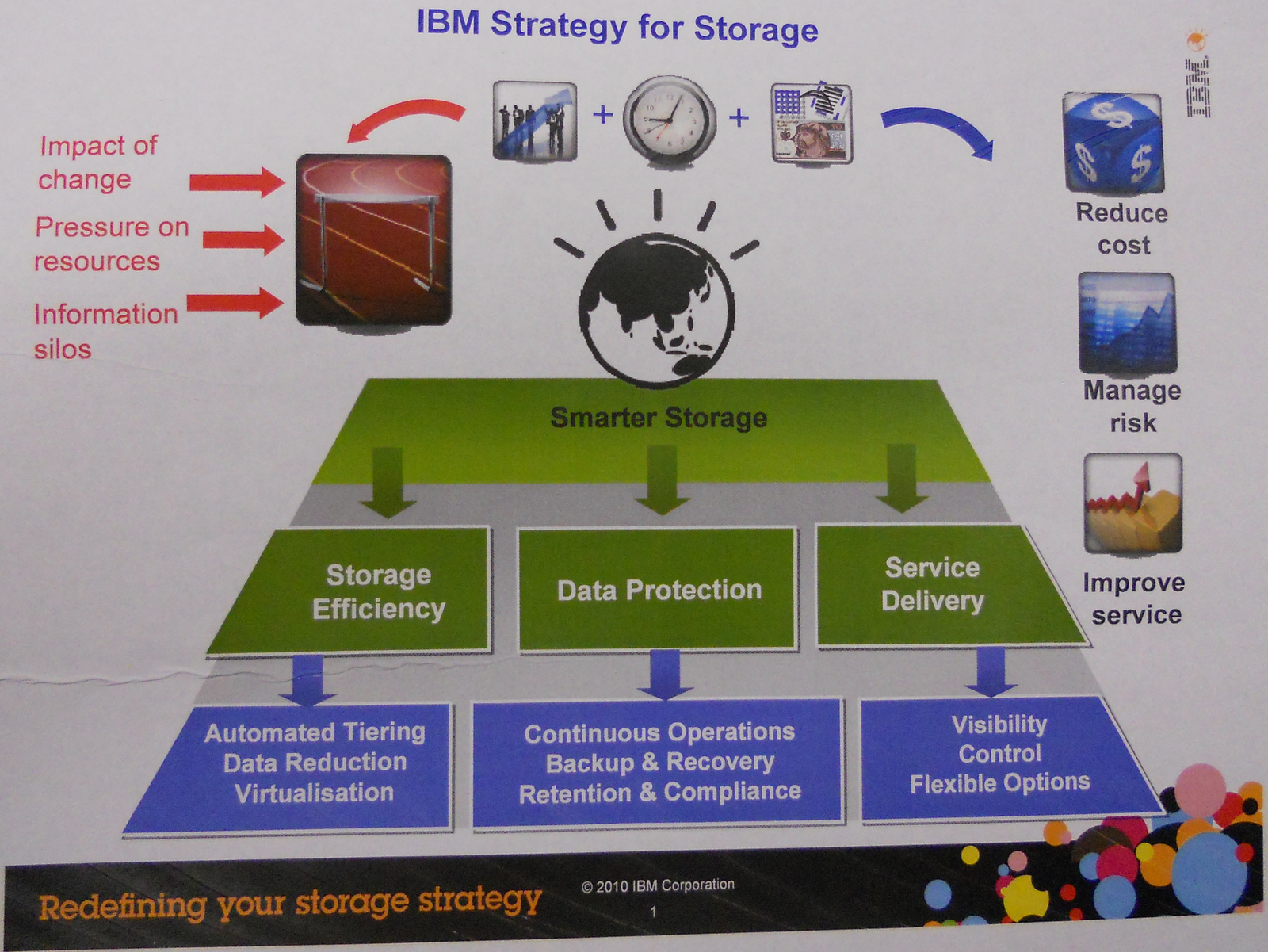
At the SNIA Australia Storage Blogfest, Anna Wells presented the IBM strategy for storage. I previously posted the brief interview we did afterwards.

Here is the full video of the presentation, which I thought was very good. I am bit of fan of white boarding a presentation myself so it was great to see someone else doing it. The structure really flowed.


Here is the final image drawn up.


Here is the version handed out afterwards.


I thought it was good that IBM found in necessary to first present their overall strategy as a place to then reference their products into. In fact a single product might address multiple areas of the strategy. It shows a good consultative approach from a vendor, not all speeds and feeds.

Rodos

SNIA Blogfest Interview with IBM

Category : , , 0

At the SNIA blogfest in Australia, Anna Wells presented the IBM strategy for storage. Anna is the Lead for IBM storage across A/NZ.


I caught up with Anna and recorded this quick interview afterwards to get a summary.


I will post up later the full video of the presentation.

Rodos

Australian Storage Blogfest

Friday, October 15, 2010 Category : , , , , , 1

Are you a blogger in Australia who covers a bit of storage? If so then you will want to know that SNIA Australia is hosting a blogfest with a range of storage vendors on Thursday November the 4th in Sydney.


Its a one day tour, face to face, with the major storage vendors IBM, HDS, EMC and Netapp.

Here is what SNIA have to say about the event :
  • Bloggers benefit from a direct engagement with the key storage vendors to learn more about their technology and product strategy. With the increasing influence that bloggers have with customers it is important that authors are technically accurate and have a broad perspective of technology and the product/feature sets that differentiate the vendors. This is a unique opportunity to do a direct comparison across four major vendors in one day, at no cost other than an investment of your time.
  • Sponsors benefit from a direct engagement with key influencers about their technology and product direction/strategy. Their participation in this session can ensure their technology is well understood by those who have the influence over customer perception. This is a rare opportunity to interact directly in an open, friendly environment with these key authors.
  • The presentation sessions will be focused on technology themes determined by the bloggers themselves. The Blogfest is a one-day event with four 1.5-hour sessions. Each session includes time for technical presentation, hands-on activities and delegate discussion. We expect direct questions and feedback in return.
This should not be a dump of the latest product releases from each vendor. It will hopefully be a good discussion on storage technologies and the market. Moving from one vendor to another you can really compare and contrast on where each stand and their strengths and weaknesses.

Here is my personal recommendation for the topic for the day (which has not been accepted yet, its just an example).
“What new technologies in primary storage do you believe really gives customers better bang for their buck in the long term? What has your organisation seen and done in these areas in the last 12 months? Which new technologies do you think might not give customers the return they may think or are to risky to adopt in primary storage and explain your reasoning.”
I think there are many ways to answer that and it will be great to hear what IBM, HDS, EMC and Netapp's views are. Could be very telling. If you have an idea of a better theme or topic let me know.

The draw backs is that you can't work for a storage manufacture, bloggers must all be recognised independent writers on data storage related subjects working in Australia or New Zealand. You will need to take the day of work and if you are not in Sydney you will have to cover your own travel costs to the event (worth a flight I say). Travel throughout the day and meals are covered.

We really need to ramp up the amount of storage blogging happening in Australia and credit to SNIA and the vendors for giving this a go. Hopefully if this is successful we can get them to cover some travel costs next time around or hold it in a different city so that more people can be involved.

If you are interested, even if you are not a blogger but a person of influence in a community, then contact Paul Talbut, General Manager of SNIA ANZ with your details via paul.talbut@evito.net (or me). You never know, you may just get an invite!

I hope to see many people there!

Rodos

CORAID

Tuesday, September 07, 2010 Category : , , 1

You meet some interesting vendors on the show floor at VMworld. One I ran into was CORAID, who have an interesting idea of not using Fibre Channel or iSCSI as the transport for storage connectivity, instead they use ATA over Ethernet (AoE). Certainly something I had not heard of before, but with all the noise around FCoE and FCoTR why not AoE.


By using commodity hardware and lightweight Ethernet vendors like CORAID can reduce the cost of deploying storage arrays. They have a range of hardware, although they don't have certification on the VMware HCL yet. I believe certification is coming soon.

CORAID have some interesting founders who have come from such places as VMware and Kidaro.

The main reason I wanted to mention them was because they are going to be present at VMware vForum in Sydney Australia on October 26th to 27th. If you are going along why don't you check out CORAID are all about. Its great to see these vendors which you come across in the US starting to take interest in Australia and attending the local conferences.

Rodos

Gestalt IT TechFieldDay Seattle - Nimble Storage

Tuesday, July 20, 2010 Category : , , 0

Take a pile of smart just with backgrounds from Sun, Netapp and Data Domain, throw in a few PHDs (I assume) and see what falls out; thats Nimble Storage who launched at Gestalt IT TechFieldDay Seattle.

The company was formed in 2008, based in San Jose. The two founders are

  • Varun Mehta (Sun, NetApp, Data Domain)
  • Umesh Maheshwari (Data Domain)
They have some interesting people on their board of directors as well
  • Suresh Vasudevan (Omneon, NetApp, McKinsey)
  • Kirk Bowman (Equallogic, VMware, Inktomi)
Nimble call their technology game-changing, taking what was available in separate products and putting it all into one. Nimble coverage of iSCSI primary storage, backup storage and disaster recovery in a new architecture that combines FLASH and high capacity low cost SATA in a new way.

This brings FLASH into the range of many enterprises who would like to use it for more common workloads like Exchange, SQL and VMware. Their target is for organisations with 200 to 2000 employees.

Nimbles competition in the iSCSI market with market sizes (from IDC) are Equallogic who have 35%, EMC 15%, HP and Netapp are around 10% each.

Nimble have done the brave thing and started with a clean sheet of paper to try and create something that no one else can deliver.

The problems they are trying to solve are delivering fast performance without all those expensive disks and how to efficiently back it all up plus replicate that data to a second site for continuity purposes.

Techniques include
  • capacity optimised snapshots rather than backups
  • FLASH is used to give great performance
  • replication that is efficient and based on the primary information so that the time to recover and use that data is very quick, you don't need to wait for a resto
A key think that Nimble bring is their CASL architecture, it provides the following :
  • Inline Compression. A real time compression engine as data comes in. On primary datasets they are seeing about a 2:1 saving and on things like databases a 4:1 saving. Blocks are variable in sizes and Nimble take advantage of the current state of multi-core processors having a highly threaded software architecture.

  • Large Adaptive Flash Cache. Flash as a caching layer, starting at 3/4 of a TB for the entry box. They store a copy of all frequently access data, but all data is also storage on the cheaper SATA storage as well.

  • High-Capacity Disk storage. Using large SATA drives.

  • Integrated Backup. 60 to 90 days worth of "delta compressed incremental snapshots" can be stored on the system. They have put a lot of work into integration with Microsoft applications, integrating the VSS for ensuring consistency. The snapshot efficiency should remove the requirement for a secondary backup system outside of the primary storage. Combine this with replication to a remote site and you have a protected system.

    Nimble showed the results of some testing they performed on a Exchange 2010 19GB database running snaps over 10 days, the other vendor (Equallogic at a guess) consumed over 100GB of data whereas Nimble only consumed 3GB. A 35x improvement was claimed. This then results in less to replicate. Its suspected that the reason for this difference is the smaller and variable blocksize that Nimble can use, the competitor has a large blocksize.

  • Replication. The replication is point in time snapshot replication. Once nice thing that you can do is maintain different retention periods at each site. For example you might want to maintain a much higher frequency of snaps locally and a less frequent but longer tail of snaps over at DR, very nice. They have a VMware Site Recovery Manager (SRM) plugin in development but it has not been certified yet. Today you can't cascade replication but it will be coming in a future release. Cascade my be important for people who want to use the Nimble for backup, replicate locally and then offsite.
The befits that result from CASL are :
  • Enhanced enterprise application performance
  • Instant local backups and restores with fast offsite DR
  • Eliminates high RPM drives, EFDs, separate disk-based backup solution
  • 60%+ lower costs than existing solutions
When you create volumes they can be tuned for various application types, tweaking such things as page size or if it should be cached. The Nimble ships with a set of predefined templates for popular appellations. The same for snapshot policies which can be templates and a predefined set are provided.

The pricing estimates they have done is at under $3 per Gb for primary storage at an entry price of around $50K.

Here is the specs of the units.


There is no 10GB interface option yet but it will be considered on customer demand. The same goes for having a Fiber Channel interface. The controllers are active, passive on a system (not LUN) basis.

They currently have 10 to 12 beta accounts.

Umesh Maheshwari then have some further details on the technology behind Nimble. A great discussion from someone who knows the industry and the technologies, as you would expect.

Nimble is all about having the
  • capacity to store backups (through hi-capacity disks, compression and block sharing) along with
  • random IO performance for primary storage (through Flash cache for random reads and sequentialized random writes)
This technique of sequentialized was developed by Mendel Rosenblum in his PHD thesis in 1991 (see paper). If you don't remember Mendel was one of the founding brains behind VMware so his ideas have a good track record. Its called a Log Structured File System.

So why has this been done before, well it took technology a while to catch up to the idea. The original concept relies on the assumption that files are cached in main memory and that increasing memory sizes will make the caches more and more effective at satisfying read requests, hence the disk traffic will become dominated by writes. With only small amounts of RAM available it was a problem. Secondly the process requires a background job to do garbage collection.

Nimble have created CASL, an implementation of the log based file system. It utilises a large amount of FLASH for the cache and its integrated closely into the disk based file system. The index or metadata of the system is cached in the Flash and therefore the garbage collection can now work efficiently. Of course cache is bit of a simple word for what it does, its not a LRU, there is some complex meta data being tracked for performance.

The second element is the sequential layout of the data on the disks. How you store data on disk could be categorised into 3 different techniques.

1. Write in place. eg. EMC, EqualLogic
  • its a very simple layout, you don't need lots of indexes.
  • reads can go quite well
  • poor at random writes
  • parity RAID makes it worse
2. Write anywhere. eg. Netapp WAFL (write anywhere file layout)
  • more write optimised
  • between full stripes and random writes
  • its write a sequence of writes wherever there is free space. So when you starts is sequential but after a while the spaces that are free will be fragmented so you end up doing random writes
3. Write sequently. eg DataDomain, Nimble CASL
  • most write optimised
  • always do you writes in full stripes
  • good when writing to RAID
  • the blocks can now be variable size which is very efficient but it has a secondary effect that you now have room to store some metadata about the block such as a checksum
  • this requires the garbage collection process which runs in idle times to always ensure there is space available for writing full stripes, what makes this work is that the index is in Flash and the power of the current set of processors
  • the difference between what DataDomain do and CASL is that DD do their sharing based on hashes and CASL does it based on snapshots
Of course this makes you wonder whats the difference between the CASL cache and what many other providers are doing with a Tier of Flash?
  • Because the cache is backed by disk (the data is in the cache and on the disk) you don't need to protect the data on the disk. This means you can use cheaper flash drives and you don't need to do any parity or mirroring giving you saving of 1.3 to 2 times.
  • Its much easier to evict or throw away data in the cache than it is to demote data out of a Flash tier into a lower one, you don't have to copy any data.
  • You don't have to be so careful about putting things in cache as its not an expensive operation so all writes or reads can be put in cache for fast access if you need it again and of course cache is a lot more effort to integrate into your file system than tiering so if you are dealing with legacy its much harder then when you are starting from scratch like Nimble have.
Thoughts?

I really got the feeling that Nimble are not trying to be everything to everyone. They are focused on a particular market segment, hitting their pain points and attempting to do it better than the incumbents are.

They have a few things to deliver in my opinion to reach the goal, such as
  • cascaded replication to offer true local and remote data protection
  • get the SRM module for VMware certified
  • its looks hard to scale out if you just need some further storage as you can't add disk shelves, you get what you get. Yet their is nothing in their architecture to preclude some changes here which is good.
The big question will be is it different enough to the competitors for them to get into the market. If you only difference is doing something better (no matter how clever it is under the hood) how easy is it for your competitors to be "good enough" or a much better price point. Some good marketing, sales force and channel are going to be key.

With CASL, Nimble certainly have some very nice technology, but nice technology does not always win in the market. Its certainly going to be great to see how their early adopters go and how they adjust the hardware range and feature set over the next 12 months!

Note that its not available in Australia or EMEA yet.

Rodos

Note : Tech Field Day is a sponsored event. Although I receive no direct compensation and take personal leave to attend, all event expenses are paid by the sponsors through Gestalt IT Media LLC. No editorial control is exerted over me and I write what I want, if I want, when I want and how I want.

HP Storage Tech Day

Wednesday, March 17, 2010 Category : , 0

In a few weeks I will be attending the HP Storage Tech Day in Houston, TX. Thanks to Calvin Zito (@HPStorageGuy / http://www.hp.com/storage/blog) for the invite.


This is a follow on from the one held last year and sits alongside the HP Infrastructure Software and Blade Day which occurred last month. The first event was the imputes for the Gestalt IT Tech Field Days.

The agenda has not been finalised but here is what is currently proposed.
Topics such as:
  • HP Converged Infrastructure, and how HP StorageWorks fits into it
  • Updates on HP’s storage platforms, and
  • How HP is competing with the other major storage vendors
You will hear from HP executives such as Paul Perez – VP and Chief Technologist of HP StorageWorks, Andrew Manners - StorageWorks Marketing VP, and several other key executives. You’ll also see demos of specific HP StorageWorks products as well as have a chance to tour some of the HP StorageWorks facilities.
I have done a bit with HP EVA's in the past and always liked aspects of their technology.

There has been so much going on in the storage world in the last year but I have not heard a lot form HP on storage. The biggest news was David Donatelli moving over from EMC and the subsequent law suit. We have had the rise of VCE and Acadia, Netapp have produced their Secure Multi-Tennant Cloud architecture. On the blade front we have HP bashing heads with Cisco around UCS, after all the now infamous Tolly report came out at the Blade Day.

So whats the strategy ongoing strategy for storage at HP? They went and picked up LeftHand, they picket up Donatelli. At the high end HP they have XP which is OEM'd from Hitachi and we have just seen Oracle drop Hitachi in preference for their new step-child Sun.

I am sure there will be lots of technical speed and feeds which I look forward to, but here are some of the high level questions I hope I can get a feel for as well. If I am thinking about these things then I am sure Enterprise customers are thinking about these as well.
  • Where does the product line sit? The products from Lefthand are great, I think they may have been the first cab off the rank with a VSA. So whats its future and what do we compare it with. Is it the HP competitor to Dell EqualLogic? EVA and XP, where are things at?
  • What about automated storage Tiering, at the sub-LUN level. We know EMC are talking up FAST2, 3PAR are releasing it and Compellent have had it for a while. Whats HP's thoughts on these areas.
  • Stack integrations looks to be the flavour of the month, EMC (with Cisco and VMware) as well as Netapp are pushing it hard. So what is HP's take on integrating their own stacks with blades, Procurve/3Com and Storage.
  • Cloud. If there was another flavour of the month its Cloud. What are HP's thoughts around storage for Cloud, either internal or service provider.
It all starts on Monday the 29th of March. I will be using Twitter and some blog posts to share my thoughts. I am sure there will be many more questions that will come to the surface before then but if you have any particular thing you would like to grill HP about their storage then post in the comments or DM on twitter (@rodos).

Should be some real geek fun.

Rodos

P.S. For the long disclaimer bit. HP will be paying my travel and accommodation expenses for this event. I can and will write what I feel like, good or bad for HP. In my day job I work for a company that is a Partner of just about every vendor. We have a awesome HP BPSA on staff (Rodos waves at Jakes), plus we are a HDS and Netapp partner. We resell UCS and I am bit of a UCS fanboy. It is what it is, this is my personal blog. Wearing two hats keeps my head warm in winter.

Powered by Blogger.