Home > Cisco

Cisco

Save the date for IIIS event in August

Thursday, May 19, 2011 Category : , , , , , , , , 0

If you are based in Australia then put a note in your calendar for August 2nd and 3rd. This is the date of the first Implementing Information Infrastructure Symposium (IIIS) which will be held at the Hilton Hotel in Sydney. The event is partnership between Storage Networking Industry Association for Australia and New Zealand (SNIA ANZ) and IDG Australia.


The first round of vendors have signed up as premier partners for the event, being :
  • Cisco
  • Dell
  • EMC
  • HDS
  • HP
  • IBM
  • NetApp and
  • Symantec
There means there is going to be some great information and speakers available. However don't think this is just going to be a vendor fest. Onwards from here
IIIS is now embarking on signing up the Technology and Channel sponsorship partners. Altogether, some 40 vendors and partners will present to delegates as well as speakers from large Australian corporations, subject matter experts, and the leading industry analyst from the USA.
If you are not lucky enough to get to overseas events such as the recent EMC World or the upcoming VMworld, I think you are going to find this event very useful. Storage and information management is a massive are of interest and development at the moment.

Hopefully I will see you there!

Rodos

P.S. Note that I am a board member of SNIA ANZ so I probably have a vested interest in people attending this. But I am a geek first and still think this is a great event anyhoo!

vForum Sydney Solution Exchange Booth Awards

Tuesday, October 26, 2010 Category : , , , , 0

In the tradition of social media we bring you the first ever (and possibly last) vForum booth awards. Success is based on a top secret criteria of awarding points in several random and sarcastic categories, as well as a little honest opinion.

Rodney Haywood and Alastair Cooke (@DemitasseNZ /www.demitasse.co.nz ) have dedicated minutes of their time to bringing you the best and worst of the booths, saving your the arduous journey through the crowds.

In no particular order, our awardees are:

Dedication to Booth Duty Award

Not a booth award, this is a personal award for the person who has shown outstanding effort above and beyond the call of duty.

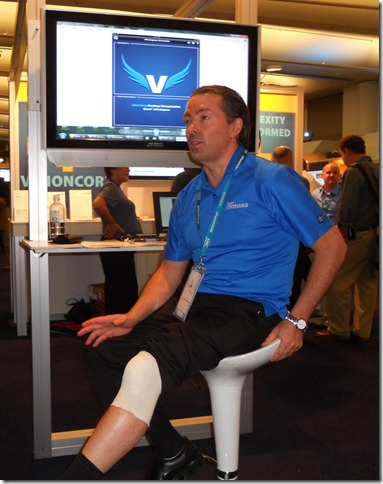
David Caddick of Quest Software wins this award for still coming to, and standing, at the Quest booth all day, after requiring four stitches in his leg this morning. David’s enthusiasm for an early jog lead him to a lacerating encounter with the back stairs.

Well done David for not giving up and being there.

The Is There Anybody Home Award

This award recognises the booth that is there but fails to deliver a visible presence of life. Is there a positive message from having a booth with nothing to deliver your message?

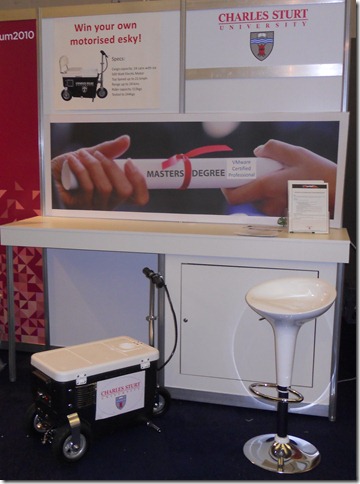
Charles Sturt university wins this award for the apparent absence of life or anything informative (apart from a mobile Esky). The presence of cold beer in said Esky would have removed this booth from eligibility for this award, alas it was a case of a pub with no beer.

Thank you, come again.

The Puritan’s Booth Babe Award.

This award is inspired by Thomas Dureya’s annual effort to decrease the amount of clothing worn by vForum Booth Babes. Our puritan family values cannot condone the use of the scantily clad female form in a male dominated event as a marketing tool, hence our award goes to the Booth Babes presenting the height of puritan values.

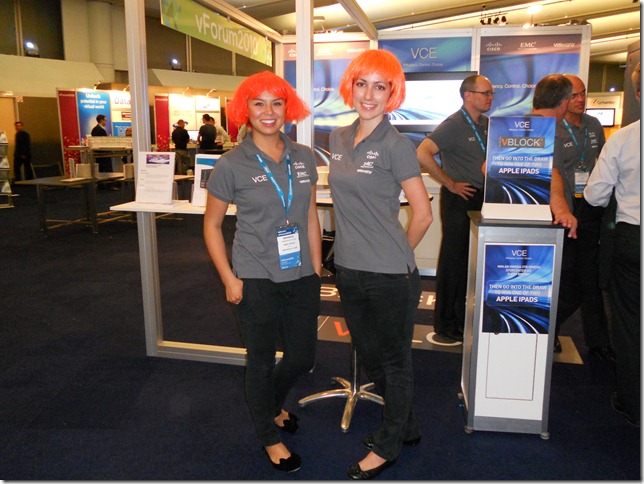
The award goes to the VCE booth where the Booth Babes were covered from ankle to neck, along with modest head coverings. This is an excellent representation of Slip, Slop, Slap that would survive even a summers day on Bondi Beach.

We are very pleased to see a number of women on booths with excellent technical knowledge, not simply Booth Babes.

Show Me The Hardware Award

This award is to recognise the hardware vendor who has failed to show their product. Attendees are all interested in viewing and discussing your wares, which is hard if there is only a brochure.

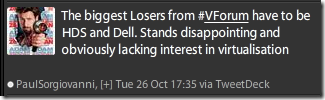
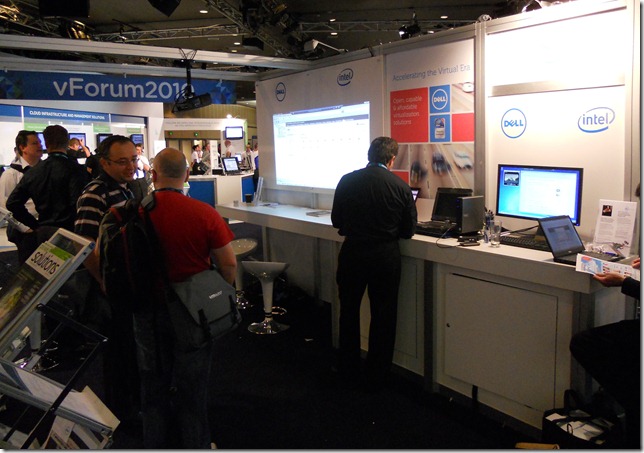
The award goes to Dell, one of the largest server and storage hardware vendors, who only had a few laptops on their stand showing powerpoint. We were not the only critics to notice the lack of tin.

Maybe it’s all in the cloud.

Bravery Award

This award goes to a vendor that has gone the furthest and taken the risks. The unkind could call them cowboys, but we call them courageous.

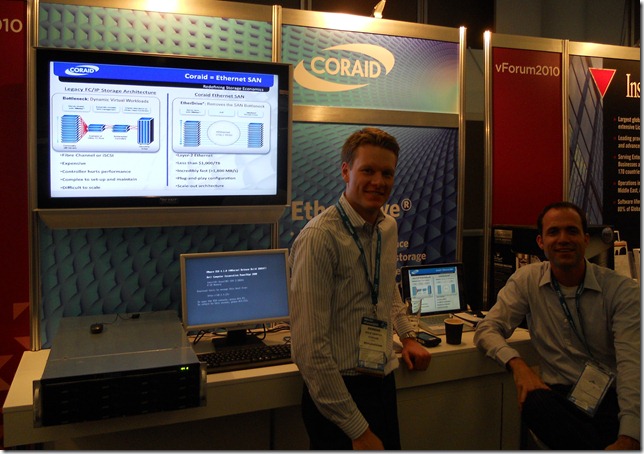
The award goes to the brave boys at CoRAID, a new entrant into the storage market in Australia. With little local sales presence and only imminent VMware HCL support they nonetheless braved the big money vendors and brought actual hardware with blinking lights. Great to see them giving it a go in this crowded space.

Bigger and better next year.

Interactive Playground Award

This award is for the booth where the geeks got to play. vForum is for engaging and learning, this award celebrates booths that do this well.

The award goes to Cisco whose booth had a structured schedule of open briefings on their products, with excellent giveaways. There were a number of blades to touch and look at their insides, the hardware wasn’t just there it was there to be investigated. There were numerous technical people who sought questions to answer.

Geeks delivering to Geeks.

Buffet Award

This award recognises the booth with the broadest range of products and solutions visible. There needs to be something for everyone and the whole family should go home having had their fill.

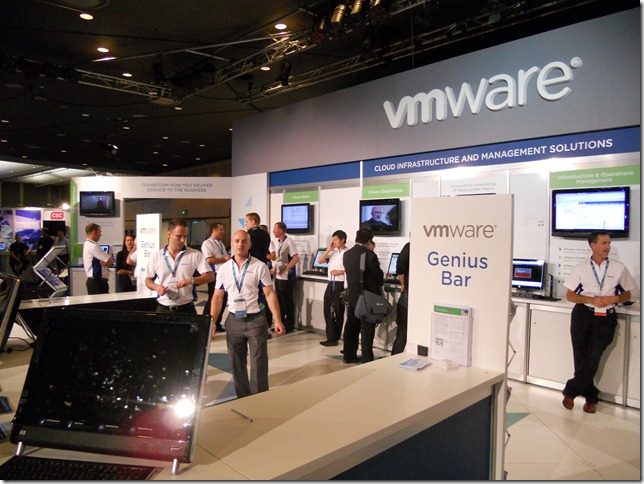
The award goes to VMware who, despite being their event, showed an enormous range of products at a detailed level, every product was actually there to be touched and used. More than a dozen products were identifiable from distance and there were experts on them all.

No one trick Pony.

Most Appealing Booth Award

This award recognises the booth that stands out and draws you to it, with so many booths it becomes a blur. Something different must greet the eye.

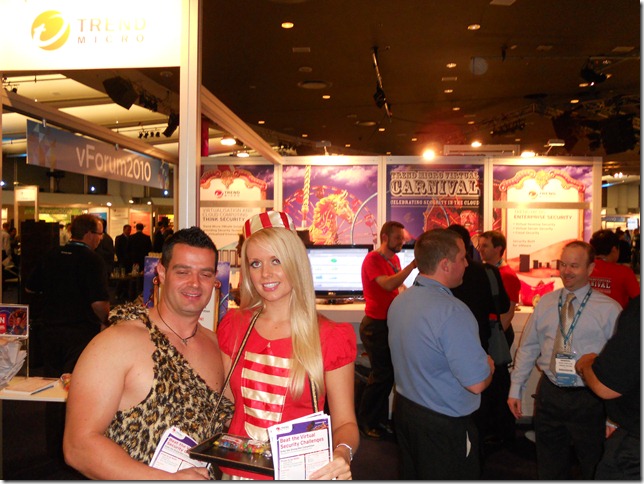
The award goes to Trend Micro for their appealing Carnival theme, from a distance you could see it wasn’t your ordinary booth. With the space limitations and sundry restrictions placed by event organisers it takes effort to stand out.

Who says conferences are all a circus?

Thanks to all the exhibitors who make the event so valuable. Congratulations to the winners. All those that didn’t make this years list should be planning for next year’s awards.

Rodos and Alastair

Monitoring your UCS faults with syslog

Wednesday, July 28, 2010 Category : , 2

When you deploy your UCS environment once of the first things you will want to do is integrate it into your monitoring system. One way is through integrating with syslog. Here are some notes and tips.


When problems occur in your UCS environment they will appear as Faults inside the Administration area. Click on the screen shot below to see some.


One thing to know is this page only shows you the current alerts, once they clear they disappear.

Here is an example alert exported from my system.
Severity | Code | ID | Affected object | Cause | Last Transition | Description
major | F0207 | 225741 | sys/chassis-1/blade-4/adaptor-1/host-fc-2/fault-F0207 | link-down | 2010-07-28T12:18:59 | Adapter host interface 1/4/1/2 link state: down

One of the key bits of information you are looking for is the fault code, in the example above its F0207. With that code you can look it up in the Cisco UCS Fault Reference.

If you search the reference for that code here is the details presented.

fltAdaptorHostIfLink-down

Fault Code:F0207

Message

Adapter [transport] host interface [chassisId]/[slotId]/[id]/[id] link state: [linkState]

Explanation

This fault typically occurs as a result of one of the following issues:

The fabric interconnect is in End-Host mode, and all uplink ports failed.

The server port to which the adapter is pinned failed.

A transient error that caused the link to fail.

Recommended Action

If you see this fault, take the following actions:


Step 1 If an uplink port is disabled, enable the port.

Step 2 If the server port to which the adapter is pinned is disabled, enable that port.

Step 3 Reacknowledge the server with the adapter that has the failed link.

Step 4 If the above actions did not resolve the issue, execute the show tech-support command and contact Cisco technical support.

Fault Details

Severity: major  
Cause: link-down  
mibFaultCode: 207  
mibFaultName: fltAdaptorHostIfLinkDown  
moClass: adaptor:HostIf  
Type: network
All codes are listed and the fault reference may be a valuable reference for you the first time you come across and error.

For here you will typically you will want send these alerts to your management platform for automated monitoring. A great way to do this is via syslog. Cisco have a good guide "Set up Syslog for Cisco UCS" you can follow for doing the configuration. Here is a shot of the page where you set it up.


Now once this is configure the alerts will appear in your syslog server.

Here is what our example above looks like as a syslog entry.
Jul 26 01:05:01 192.168.128.16 : 2010 Jul 26 01:08:54 EST: %LOCAL0-3-SYSTEM_MSG: [F0207][major][link-down][sys/chassis-1/blade-4/adaptor-1/host-fc-1] Adapter  host interface 1/4/1/1 link state: down - svc_sam_dme[3250]
Jul 26 01:05:14 192.168.128.16 : 2010 Jul 26 01:09:07 EST: %LOCAL0-3-SYSTEM_MSG: [F0207][cleared][link-down][sys/chassis-1/blade-4/adaptor-1/host-fc-1] Adapter host interface 1/4/1/1 link state: down - svc_sam_dme[3250]
You can see that fault ID F0207 which you an use as a reference. But also notice I have copied in two entries. One is the first event where the fault occurred and the severity level "major" and then there is another entry which states "cleared". You will want to filter out the cleared ones or if you have a smart system get it to match the two so you know which events have been resolved.

Hopefully the examples assist some people.

Rodos

UCS Platform Emulator

Tuesday, July 27, 2010 Category : , 11

Cisco have released an emulator for the Unified Computing System (UCS). If you are working with UCS you can now run UCSM from your desktop without needing hardware, making training, testing and documentation much easier.


To get started go to the download page at http://developer.cisco.com/web/unifiedcomputing/start and complete the registration form [update : the form validation is very painful, just keep trying, ensure you fill out all fields and maybe put in a valid phone number format]. You can then download the virtual machine which runs the emulated environment. The download is 2.16Gb.

Open up the VMX file in your favourite VMware software (I use Fusion on my MacBook) and it will boot giving itself an IP address. It only uses a single vCPU, 1G of RAM and close to 6GB of disk.


Most of your activity will be via the GUI but you can change what your emulated UCS environment looks like via the console of the machine. Login with the username "config" and password "config" and you are presented with a simple menu.


Its handy being able to set the number of chassis and blades. You don't have a lot of flexibility, for example all chassis have the same number of blades and you can't have 4 uplinks, only 1 or 2.

Once you have configured up your environment point your web browser to the allocated IP address. Click the "launch" button to load the Java management GUI.


Once you log in you have the standard interface and can interact with many of the elements.


Of course as its an emulated platform so some things don't work such as the no data path, no SNMP, no KVM, no Telnet/SSH, no CLI, no RBAC and limited HA functions. Also the the VMware tools in the machine is out of date. Sounds like a lot but its still quite functional.

If you or others in your company need to work with UCSM I recommend you check the emulator out.

Rodos


More VLANs for UCS

Friday, June 25, 2010 Category : , 2

Just a quick note that the new release of UCS Manager (UCSM) for the Cisco Unified Computing System now supports 512 VLANs. Many have been waiting for this increased support and there are more to come in the future.


The version is 1.3(1), the details of the update (apart from this hidden fact) are in the release notes.

Other tweaks are:
  • UCS Manager now supports up to 14 chassis (was 12)
  • Blade level power capping
  • Setting additional BIOS parameters in service profiles
  • Configure vCenter wizard
  • SNMP traps extended to chassis and blades.
Rodos

Stack Wars

Thursday, April 22, 2010 Category : , , , , , , 0

Stephen Foskett (http://blog.fosketts.net/ @SFoskett) has started a series over at GestaltIT on the Stack Wars topic. Stephen reached out to a few people in the blog space to see what they thought. I thought his questions were really interesting so gave it some thought (okay it was only enough thought that could be done on a bus trip to work).


To the questions.

Why is this happening?

I think a number of factors have lead to the "stack" or the return to the mainframe model.

One of these is virtualisation. Virtualisation has in many ways collapsed the different components of compute, networking and storage into a blob where differences in each individual layer are diminished. The layers are abstracted away through the hardware independence and it starts to make sense to obtain an entire "virtualisation" machine rather than build it from scratch each time.

Likewise the continue performance improvements means that these more generic solutions can solve a might greater scope of workload than ever before. Certainly the advancement in hardware processing capacity has outpaced softwares ability to consume it.

The second element is the change in behaviour of the vendors. The vendors are much more willing to get in front and sell to end users these days. Even those vendors who are so channel focused do this. I remember 10 years ago in the integration space; it was only the top of town that could get a sales person or a system engineer from a vendor to visit and flaunt their wares. These days, if you are a fish and chip shop you could probably get a vendor to turn up for a presentation and a proof of concept.

However the vendors are realising what the system integrators learnt a long time ago, there is money to be made by combining all the parts and providing a whole solution. Plus the cost of sale can drop if you can have a few packages that fit most sales, rather than doing everything as customised solutions.

The vendors have realised that by using virtualisation and stacks they can make larger sales whilst reducing their cost of sales whilst targeting an increase number of opportunities.

Is this good for end-users?

It is probably a little early to see how the benefits for end users will pan out. If we learn from history the mainframe era certainly had its drawbacks for many organisations towards the end.

There are certainly some up sides for the end users. Improved levels of support and integration can't be bad. Certainly lower costs by removing lots of customised design work and through economies of scale is going to be a benefit.

But there will be drawbacks too. I don't think anyone has been thinking or talking about the lifecycle of these stacks. Will you have to replace the entire stack each time at end of life to keep your support? What if you are happy with your compute and storage but have brought in a new networking fabric that is much faster, do you have to throw the baby out with the bathwater?

Where are IBM and Dell?

My hunch is that IBM and especially Dell are in the wings waiting to see how things pan out. Let the early adopters play and make the market, see where the success and failures are. Once they have learned from all of their mistakes they can swing in bringing in their existing value propositions. They don't want to leave it very long but we are still in the incubation period for the stacks.

I think Dell is the one to watch here rather than IBM. After all they have been essentially doing this today in the lower end of town. They have the parts to bring it together and they can suck the bottom tier right out of the market from under everyone else.

Of course HP is the other one to watch very carefully, especially now that 3Com is on board.

What about the smaller players?

If the stacks take off the smaller players are going to continue to do what they have always done, value add. Many elements of technology have turned to commodity. Remember the days when you would always pay people to come in and do Exchange deployments. Remember how hard it was to maintain Unified Communications solutions. Over time the technologies became utility enough that organisations could do these themselves.

Smaller players, whether they be systems integrators or vendors will continue to find those niche requirements and the hard projects or problems that will always be around. Our consumption of technology is growing not shrinking, the small players will continue to deliver and support the early adoption technologies.

What does this do to innovation?

Many people in IT need to understand that we are in a young industry which is starting to mature. A lot of stuff really is going to become utility and standardised, thats the way industries evolve. Yet innovation still continues in mature industries.

What about cloud?

Bingo, we can't talk about anything with mentioning Cloud. Are the stacks the vendors means of abating the move of all of the revenue to a handful of global cloud providers. Build an internal Cloud with our stack please so we can keep making some money off you.

I see the stacks working well with the Cloud, certainly the IaaS and PaaS based ones. Improved standards adoption will allow the federation and creation of meta Clouds. So there is still a place for internal work loads (there is some good thinking on this that uses the commercial property market or food production analogies).

What I DO predict we will see is the vendors offering the stacks to Enterprises is Cloud based service models for internal use. How do people consume photocopiers and printers today, they pay per page. The vendor puts in the equipment, maintains it and supplies it, you just pay for what you use. In the future we are going to see this model start to appear more in IT, once you have a utility stack, this can successfully be achieved for the vendor and the Enterprise. By the way virtualisation is the key enabler here, abstracting away all the hardware from the workloads.

Is this the ultimate form of IT infrastructure?


The word "ultimate" makes it sound like the most amazing. No, I don't think its going to be the ultimate. I think the stacks might become the boring utilities they they are meant to be. A standardised, reliable, cost effective computing block thats does what it is tasked to do, no more and no less. Its the IT version of the multi-function photocopier. Roll them in and roll them out. The stacks are more about an operational model than speeds, feeds, dials and knobs.


Well there you have it, thats enough for me to come up with on a bus trip. Be keen to hear your thoughts, post in the comments.

Rodos
Overlay Transport Virtualization

Monday, February 08, 2010 Category : , 0

I am seeing quite a few comments appearing regarding Cisco Overlay Transport Virtualisation recently so I figured it was worth commenting on.


One element of Cloud is being able to easily move workloads around, in and out. The harder this is the more difficult the adoption. If you have ever architected or even harder, implemented, a DR solution you know that re-addressing the networking for a pile of machines can be either difficult, "non-trivial" or just down right impossible. At the same time we see companies such as EMC and F5 working on doing VMotion across sites.

An outcome of this workload migration into the Cloud and long term VMotion across sites is the spreading of layer 2 networks across physical sites. Of course this can be done today but there are all sorts of limitations and difficult bits.

Cisco have been working hard on this problem and have come up with Overlay Transport Virtualization (OTV).

Some big players such as Terremark have been trailing OTV, interconnecting three of their data centres. "[...] the company likes what it has seen as an early beta tester of OTV and the Nexus 7000 switches it runs on. Interconnecting data centers takes minutes instead of several hours, says Mike Duckett, Terremark’s general manager of network services." You can read more about Terremark and OTV at this Network World article.

Also, Omar Sultan of Cisco has posted some initial information and a video [shown below] detailing more about OTV.


Its important to note that at the moment OTV is a "Nexus 7000 specific feature" and that they are looking at supporting other platforms and submitting to the standards bodies. I think this is critical for Cisco, there is a lot of Catalyst 6500's out there and not all enterprises may be willing to migrate to the higher end Nexus rage yet without having all of the service modules available.

If you are thinking Cloud for the Enterprise, then my advise is you want to keep an eye on OTV.

Rodos

Cisco sells over 400 UCS systems and executives bullish on VCE

Saturday, February 06, 2010 Category : , , , 0

Cisco had their quarterly quarter earnings call a few days ago [transcript care of Seeking Alpha]. These things are really interesting and I am starting to follow them. The senior people give some good summary of they latest goings on in their company and the analysts usually ask some good questions.


A few comments were made about Cisco UCS.
  • Chambers : "Our UCS numbers are still in the early stage of customer acceptance and palettes, but again showed sequential (inaudible) rates of over 100% and now over 400 customers have ordered from Cisco."
  • Chambers : "So in terms of the datacenter area we're starting to win the architectural battles, you're seeing the value on BTE with EMC and BM where you're seeing that it isn't about server standalone technology. We have no interest in that, but architectural plays. We're off to a good start. "
Interesting, 400 customers of which some would be large and some small purchases (remember how much UCS kit was at VMworld last year!). Also that the top brass view UCS as an architectural play. Interesting to see the reference to VCE (I think the BTE and BM are transcript errors for VCE and VM). Its not about isolated server technology.

There was a longer question and answer on UCS.
Richard Gardner – Citigroup

Okay great. Well, most of my questions have been answered, but I did want to ask you where you're seeing the most success in UCS? You're obviously on a pretty good trajectory there quarter to quarter. Where are you seeing the most success in terms of applications in workloads? Can you talk about who you go up against most often in competitive bidding situations? And why customers choice UCS over competing products when they (inaudible) as your product?

John T. Chambers

Let me take a little bit of cut at it, but I want to also not mislead you. We’re just up to 400 customers. Most of those are doing pilots and implementation. How the first couple dozen go in the big account service providers and enterprise to determine how your next wave goes. Why we’re winning, it’s an architectural play. I (inaudible) it’s a very well class product which in my opinion one that is well ahead of our competitors at this point in time. But it’s the architecture and how the network and possessing capability and storage capability comes together with the applications and the cloud. And the ability to build the architectures where many of the costumers are doing net.

Others are doing it and we’ve been surprised a little bit we’re off in the commercial market play with some real leading edge commercial customers just saying, hey, you save so much in terms of my splurge costs. So much in flexibility and you’re headed to where you’re going to go without locking me in and best in class products in each category. We’re going to line with you.

I probably would say, I would poll a discussion on tele-presences for the next quarter call. We’re probably two quarters out from being able to do the same meaningful discussion on the UCS side of the house. So what I think you can say is that we’re not only holding our own in the data center and virtualization. Padma, what you started with Cloud and what we’re really driving through, we’re having very good success with.
So early implementations of UCS have gone into big service providers and enterprise. How the early implementations succeed is key for ongoing success. Again mention of UCS being an architectural play with reference of how it is networking, processing and storage combining to deliver applications and Cloud.

Certainly looks like the stack is important to the executives at Cisco.

I wondered if it was the same over at EMC, so I dug up their latest earnings transcript. Asking about pipelines William Fearnley asked Joe Tucci "where are the bright spots here when you look across the world for 2010?" The second element to the answer was :
I think there are a lot of opportunities on the back of our partnerships with Cisco and VCE, and revitalizing our DELL partnership; I think those two are massive opportunities for us if we do them right, and I believe we can do them both right. Of course, as we really get into this next generation of how we take the cloud computing and really bring it, internal or private cloud market is going to be a big, big, big opportunity for us and how we really execute on that is phenomenal.
So Tucci is thinking the same as Chambers, VCE, big opportunities and Cloud. I suspect these guys are probably smarter than you or I. If they are betting big something might just be in this. Then of course, maybe they have just spent "big, big, big" money and they want some "big, big, bigger" return on their investment.

Rodos

UCS local disk policy + some vBlock

Friday, February 05, 2010 Category : , , , , 5

I have been reading through all of the VCE vBlock reference documents that were recently published as announced by Chad. The last thing we want is for our implementation to be forked, away from the blessed best practices. [jump to the end for brief comments on the guides, this post is about something else]

In the deployment guide it details various UCS manager policies that should be created, I noticed that it specifies creating a "Local Disk Configuration Policy" set to "No Local Storage". The default is for any configuration.


Sidebar - Local disk configuration policy explained.
What the Local Disk Configuration Policy does it configure up the installed disks in your blades as the service profile is deployed to them. Forget going into the BIOS and setting things up, this is virtual hardware and stateless computing people. You just pick a policy, of say RAID Mirror, and when your server profile is applied to the blade it configures the RAID controller automatically. As an aside, you can also have local storage qualifications to even say what size disk you want, so you can deploy your server profile asking it to find a spare blade that matches your requirements.
The reason why I noticed it was because this caught me out during deployment/testing. When it means No Local Disk it really means no disk. We started with this exact"No Local Disk" policy. During some deployment we noticed that no spare blades could be found. After a short time of head scratching we realised that the only blades left were some that had local disks. Its a true testament to stateless computing when you start to forget what hardware you have and where it is, just letting the systems consume it for you. A quick change to a policy of any configuration and it was off and deploying again.

Of course I am going to put the policy back the way it was eventually (when we pull the drives out of that set of machines), here is why :
  • Security - To perform stateless computing you are booting from SAN and local disks are usually not required. The only case would be local scratch disk that was transient. You don't want to be writing data to the local storage and then for some reason redeploy your server profile onto another blade, leaving that data behind, bad security move.
  • Scrub Policy - Those who know a bit about UCS may say, "Rodos, just create a Scrub Policy". A Scrub Policy scrubs the disk so that a subsequent service profile has clean disks. Problem is that its not effective. Not being one to trust anything I dug into how it scrubs, all it does is overwrite the start of the disk with some zeros, it does not scrub the whole disk with multiple passes. Its a future function to make it a more secure scrub but as it is now I bet you could somehow get at that data.
So my recommendation which concurs with the vBlock guidelines is. Boot from SAN, set a No Local Storage policy and let the automation of UCS stateless computing take care of things for you.

Rodos

P.S.

My thoughts on the VCE vBlock guides themselves. I have skimmed through them all, initial impressions. Of course I will send some notes to those inside the VCE organisation through channels but I figured people would be interested. Reading the VCN (Netapps) document is on my list too, will be interesting to compare.
  • Don't think these will do your work for you. They leave more as an "exercise for the reader" than you might think. Its not a design of your system and you are going to have to do some significant work to create a solution. I know, I have just done it.
  • There is a lot of detailed information in the deployment guide about UCS and UCSM, very detailed. There is a bit about the EMC storage and a token amount on VMware. Sure it is not a very fare comparison because its easy to describe and detail how to build up the UCS system, whereas in contrast its not like you can describe laying out a VMax in 20 pages. Also the VMax design and implementation service comes with the hardware anyway. The VMware component consists of how to install ESX, not a mention of vCenter Server. Nothing about setting up N1K and its VSMs or PowerPath/VE etc even though they are a requirement of the architecture. Not saying that should be there in detail, but you are not deployed without it and its not even mentioned. Contrast this to the UCS blade details which has every screenshot on how to check the boot from SAN has been assigned correctly in the BIOS.
  • My gut feeling is that no one from VMware really contributed to this, it was a Cisco person who did the VMware bits and EMC did theirs.

My Cisco UCS system in the lab can't talk to anything

Wednesday, February 03, 2010 Category : , 0


If you are lucky enough to get a Cisco UCS system for your lab you might get a bit confused if your run it up and don't connect it to any upstream switches. That is you try to just use the blades to talk to each other.

The reason is that the default mode for the Fabric-Interconnect is End Host Mode and by default the uplink fail action is link down, so the NICs on your blades look down.

I have seen people hit this problem so thought I would quickly write something up.

Lets start with a refresher on the way the switching in the Fabric Interconnect works.
Your UCS Fabric Interconnects (F-I) can work in End Host Mode (EHM), the recommended setting or Switch Mode. In EHM the F-I "forwarding is based on server-to-uplink pinning. A given server interface uses a given uplink regardless of the destination it’s trying to reach. Therefore, fabric interconnects don’t learn MAC addresses from external LAN switches, they learn MACs from servers inside the chassis only. The address table is managed so that it only contains MAC addresses of stations connected to Server Ports. Addresses are not learned on frames from network ports; and frames from Server Ports are allowed to be forwarded only when their source addresses have been learned into the switch forwarding table. Frames sourced from stations inside UCS take optimal paths to all destinations (unicast or multicast) inside. If these frames need to leave UCS, they only exit on their pinned network port. Frames received on network ports are filtered, based on various checks, with an overriding requirement that any frame received from outside UCS must not be forwarded back out of UCS. However fabric interconnects do perform local switching for server to server traffic. This is required because a LAN switch will by default never forward traffic back out the interface it came in on." (source)
So local traffic between the blades stays inside and everything else is throw North bound to your main switches, which in this case don't exist. (Can you tell I am not a networking guy). Based on this, sounds like your blades will have no troubles talking to each other right, wrong.

Normally your F-I is going to be North bound connected, there is little sense being isolated. But remember, there are two Fabrics in your UCS environment for redundancy (or there should be). You are going to have two F-I, an A and B side, and each of these will be connected North bound.

For a visual picture of this see my previous schematic.

Now here is the kicker that cause the lab scenario problem. In the normal world what would you want to occur if your F-I lost North bound connectivity thus causing it to because isolated from the rest of the world? Your blades are going to be sending out traffic and its going to drop. Yet you have another F-I and because you have everything nice and redundant the traffic can probably go that way. You probably want the vNICs to go down so the system knows to send its traffic out the other Fabric.

So, in UCS there is an uplink-fail-action Network Control Policy. What this policy does is define what should happen when your uplinks fail (or in your lab case not even connected). By default the policy is link-down, which causes the operation state of the vNICs on your blade to go down in order to facilitate fabric failover for the vNICs. The alternative is warning which leaves them active. The setting is done through the CLI and can be found in the documentation here. So in your lab change the policy to warning and things should start working.

Of course in your lab you could change to Switch mode, but that would be no fun at all. Hopefully this helps someone from banging their head against the wall for a shorter time than you otherwise might.

Rodos

Cisco UCS deploy and ESXi 4 install guides

Tuesday, November 17, 2009 Category : , 1

Cisco have posted two documents into their support forum around deploying the Unified Computing System (UCS)

Deploying UCS Blade Server with UCS Manager for Virtualization

The documents include many screen shots and may serve as a good primer for those wanting to investigate UCS.


I do think that the Fabric Interconnect setup section in the first document should have the CLI method included as well. Likewise as most implementations will require the setting up of a pair of F-I's this part should be there too, after all its not difficult.

The VMware ESXi install instructions talk about changing the boot order in the blades BIOS, however this should really be done from within UCSM. It also covers local installation and not boot from SAN which should be the typical deployment.

Rodos

Cisco view of Virtualization link to Cloud

Wednesday, October 14, 2009 Category : , , 0

Are Cloud and virtualization (specifically the server type) the same thing? It's a question often asked. In the following video, Glenn Dasmalchi, technical chief of staff in the office of the CTO at Cisco, provides a summary of how cloud computing and virtualization are related.


Glenn states that Cloud is IT services which are on demand and elastic. Server virtualisation brings economics (savings through better utalisation) and flexibility (for on demand deployment along with movement within or across data centers) to the use case for the Enterprise.

Rodos

Twitter shirt

Category : , , , 8

Sometime we just embarrass ourselves, today was one of those days.

As I got dress this morning I figured I would try out my new t-shirt ordered from http://www.customtees.com.au/. All I can say is my wife burst out laughing, rolled over in bed and continued laughing. All day I have been getting weird looks from people in the office.


I don't know whats wrong with everyone. I think its cool, which makes me sad I know.

You know you want one, you just can't admit it.

Rodos

UCS Palo and C-Series

Saturday, October 10, 2009 Category : , , 2

The Register has published some of the information regarding the awaited Palo adapter along with the C-Series rack servers for Cisco Unified Computing System (UCS). Now that some of its public, even though many already know about it, we can start talking more outside of our NDAs.

Have a read of the article but here are the highlights or new things.

Some of the C-Series models will start shipping this year.

  • C200-M1, two-socket, 1U rack box, up to 96 GB of main memory, two PCI-Express 2.0 slots and up to four 3.5-inch SAS or SATA drives. Ships November.
  • C210-M1, two-socket, 2U rack box, up to 96 GB of main memory, five PCI-Express slots and up to sixteen 2.5-inch SAS or SATA drives. Ships November.
  • C250-M1, two-socket, 2U rack box, up to 384 GB of main memory with the Catalina memory technology and up to eight 2.5-inch SAS or SATA drives. Expected to ship in December.
Starting to ship any day is the full width B250-M1 blade. This model has the Catalina memory technology to go to 384 GB of main memory. It also has 2 Mezz cards so it can provide 40Gb of bandwidth, 20Gb of each fabric (F-I A/B).

The article also gives a production name to the long awaited Palo card, being the Virtual Interface Card (VIC). The VIC is a CNA that in theory "supports up to 128 virtual network interfaces (vNICs) on the C-Series version of the card, which plugs into a PCI-Express 2.0 x16 slot, and up to 64 vNICs on the mezzanine card that plugs into the B-Series blades". The PCI-Express version of the VIC will ship in December.

In order to run the VIC (Palo) with VMware you will need to upgrade your vSphere to the next version, vSphere Update 1 (40u1), which is not released yet. Given that these cards are going to start to appearing soon you would expect that Update 1 may be coming soon! I certainly won't be saying when in this post!

Lastly details of something that I think a lot of people don't realise about the C-Series blades
it is not possible to use the C-Series rack servers in conjunction with the UCS box, which has the system and network management software converged into the UCS 6100 switch. [...] But sometime in the first half of 2010, Cisco is going to allow the C-Series racks to plug into the UCS system.

Until then, customers have to use C-Series racks servers as they would any other such machine, using a variety of in-band and out-of-band system management tools and KVM switches, and perhaps plugging them into Nexus 5000 switches to at least converge network and storage links into the server.
If you would like some more details on a few of these items. I detailed the extended memory technology called Catalina, videos of the B250-M1 extended memory blade along with a VIC (Palo) adapter and a lame unprepared video of a C-Series.

[Update : Here is a video from Cisco revealing many of the details. http://www.cisco.com/en/US/products/ps10493/index.html]

Rodos

Downloading software for Cisco UCS

Wednesday, October 07, 2009 Category : , 0

Wonder where to go to download software/firmware for your Cisco Unified Computing System (UCS) system? It can be hard to find, there are so many different locations for UCS info.

Here is the link, http://tools.cisco.com/support/downloads/go/Redirect.x?mdfid=282558030. You will require a CCO login to get access.

Once logged in this is what you will see.


I hear there is a new release of UCSM in the wings, which is required for the Palo card. So you will want to keep this link handy.

Of course, I have updated my UCS Resources page with the link. Although the page is getting messy, I must restructure and review it, but everything important is there.

Rodos

Error on Cisco UCS pinning training

Category : , 7

A quick heads up, Cisco have been teaching everyone the wrong thing on the pinning of UCS.

A lot of people have been going on the Cisco Unified Computing System Bootcamps, such as myself, Scott Lowe, Rich Brambley and Brian Knudtson.

One of the important things they teach you is about the pinning, a big deal is made about it in the class (well mine anyway). Here is the page from the course notes, sorry about my scribbles.


The most common implementation will be 2 links from the IOM to the F-I. I have been testing in the lab this week the pining, how to re-pin, how long it takes. Was planning on writing it all up. However one thing I have noticed is that the pinning was all backwards.

Beware its the opposite to what they teach.

When you have 2 uplinks it actually works like this

Port 1 on the IOM goes to the ODD (not even) blades, thats 1,3,5,7.
Port 2 on the IOM goes to the EVEN (not odd) blades, thats 2,4,6,8.

When doing your design for load balancing and failure procedures things like this do matter and I am a little annoyed that Cisco could get this wrong.

I thought it may have been a problem with the early course notes, but I contacted Brian Knudtson via twitter a few minutes ago who just happened to be sitting in a bootcamp as I type, he checked the current notes, still wrong.

Its obviously an error in the technical editing but I can't believe it has not been picked up. Cisco, please update your documentation and train people right. I will also go through some official channels to get it fixed.

More details on pinning thing to come, when I finish my testing and analysis. Lucky I don't believe what I read!

[UPDATE] Note that page 166 of the "Project California" book has a table that gets this right, its in the section "Redwood IO_MUX" (Thanks to David Chapman for pointing this out). There is also a very interesting statement "In future releases the configuration of slot pinning to an uplink will be a user configurable feature." Sounds interesting. Now that I know a lot more about UCS I may go back and read the whole black book again, my first reading was days after the book was released, I may pick up a pile of new things this time round.

Rodos

P.S. Sorry if I sound annoyed, I have been passing this info on to many people, and I don't like having to go back on my statements or look stupid. I now need to go and update all of my UCS diagrams I have been spreading around (which detailed the pinning). Like finding the boot order bug, this is why we doing testing.

Cisco Networkers Brisbane 2009 Customer Appreciation Party

Saturday, October 03, 2009 Category : 1

Here is the video from the Cisco Networkers Brisbane 2009 Customer Appreciation Party


Thankfully thats it, me and my great Flip Camera are all video'd out!

Rodos

Cisco TAC support for Unified Computing System (UCS)

Friday, October 02, 2009 Category : , 0

Whilst at Cisco Networkers in Brisbane this week I caught up with Robert Burns who leads the support team for Server Virtualization & Data Center Networking at the Sydney TAC. Cisco run a follow the sun program so Rob and his team cover UCS support for the globe at certain times of the day. As the TAC team get the first access to the hardware they also give great feedback to the BU on the technology.

The video below is an interview I did with Rob on the role the TAC plays for UCS support and what he thinks of the technology.


Its great to know that there is a comprehensive bunch of people who really know the kit well to support any potential issues that may arise. After chatting to Rob I can tell you, he knows his UCS.

Rodos

Brad Wong talks about FCoE

Category : , , 0

Whilst at Cisco Networkers I caught up with Brad Wong. Brad is the Product Manager for Nexus and the Unified Computing System (UCS) in the Server Access Virtualisation Business Unit (SAVBU) at Cisco Systems. I have meet with Brad a few times before and he was very gracious to give his time for me to ask him a few questions around FCoE.

I certainly think that FCoE is important for Data Centers over the next few years, yet there is confusion around how to use it today and where its going. So I was very keen to get Brads take on it, after all he drives the products where most of this lives.


Given a bit of time I will post up some deeper details of some of the things that Brad mentions along with a series of links.

Cheers

Rodos

Tommi Salli talks about Cisco UCS

Thursday, October 01, 2009 Category : , , 0

At the Customer Appreciation Party at Cisco Networkers 2009 in Brisbane Australia I was fortunate enough to be introduced to Tommi Salli (thanks Andrew White from Cisco).

Tommi is a Senior Technical Marketing Engineer for the Unified Computing System (UCS) within the Server Access Virtualisation Business Unit (SAVBU) at Cisco Systems. Tommi was one of the co-authors of the original UCS book "Project California: a Data Center Virtualization Server - UCS (Unified Computing System) by Silvano Gai, Tommi Salli, Roger Andersson", which can be purchased through Lulu. I ordered my copy within hours after it was available and it is now dog eared and covered in highlighter. The book is an introduction to the technology, I therefore don't really use it any more unless I am after some great words when writing up prose on a particular topic.

We discussed lots of areas of UCS together and I thought it would be good to do a quick video, which Tommi was gracious enough to do. Thanks mate! Hope you enjoy watching it as much as I enjoyed doing it.


Rodos

Powered by Blogger.